Table of Contents
- Why 16×24 is the Next Frontier in Album Design
- The Designer’s Ally: Essential 16×24 PSD Templates
- Maximizing Impact: Tips for 16×24 Album Design
- Why 16×24 Album PSD Templates Are a Game-Changer for Photographers in 2026
- Frequently Asked Questions.
Every wedding is a different epic, full of intense feelings and ephemeral moments. Our ultimate objective as photographers is to capture this story in a way that will be treasured for all time. Enter the 16×24 wedding album—an often underutilized, yet incredibly powerful format that allows stories to unfold with breathtaking scope and detail. For those ready to create truly immersive keepsakes, leveraging the right 16×24 Wedding Album Design PSD Templates is a game-changer.
Why 16×24 is the Next Frontier in Album Design
The choice of album size profoundly influences how a wedding story is perceived. 16×24 isn’t just about ‘more space’; it’s about:
- Panoramic Presence: This generous size allows for stunning panoramic spreads that capture the vastness of a venue or the energy of a crowd, creating a sense of being right there in the moment.
- Focus on Detail & Emotion: With ample room, even subtle expressions or intricate details on a dress or decor become prominent, enhancing the emotional connection for the viewer.
- Strategic Storytelling: The larger canvas enables thoughtful grouping of images, building sequences that guide the eye naturally through the day’s progression without feeling rushed or cluttered.
- Luxury & Distinction: Offering a 16×24 album positions your services at a premium level, providing clients with a luxurious, bespoke product that truly stands apart.
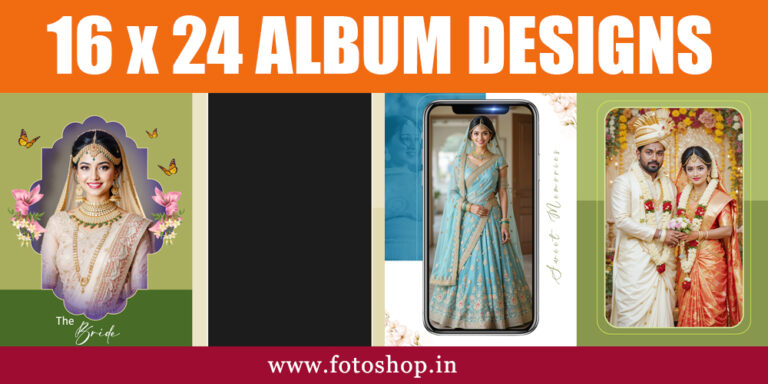
Screenshots of Latest 2026 Wedding Album 16×24 PSD Designs -02


The Designer’s Ally: Essential 16×24 PSD Templates
Designing a large-format album from scratch can be a time-consuming endeavor. High-quality 16×24 PSD templates are designed to streamline this process, allowing you to unleash your creativity efficiently:
- Precision and Professionalism: Reputable templates are built with correct print specifications (e.g., 300 DPI resolution, CMYK color, bleed, and trim lines), ensuring your designs translate perfectly to print.
- Smart Object Integration: This is key for efficiency. Smart Objects allow you to simply drag and drop your high-resolution images, and the template automatically scales and crops them to fit, preserving quality and saving countless hours.
- Diverse Layout Options: Look for template packs that offer a wide array of layouts—from elegant single-image full spreads that make a statement to dynamic multi-photo grids ideal for showcasing a sequence of events.
- Customizable Elements: The best templates provide flexibility. You should be able to easily adjust colors, fonts, backgrounds, and graphic elements within the PSD files to align with the couple’s personal style or your brand aesthetic.
Maximizing Impact: Tips for 16×24 Album Design
Even with the perfect templates, your artistic input makes all the difference:
- Prioritize Key Moments: Given the larger canvas, be intentional about which images get the most prominence. Reserve full spreads for the most impactful, story-defining shots.
- Create Visual Rhythm: Vary the density of images on different spreads. Some might be minimalist, focusing on one or two strong images, while others could be more dense collages, creating a dynamic visual flow.
- Consider the Flow: Design the album so that each spread transitions smoothly into the next, building a cohesive visual narrative from the beginning of the day to the grand finale.
- Minimalist Accents: Sometimes, less is more. Strategic use of text for quotes, vows, or significant dates can add a personal touch without overwhelming the visual design.
With the help of user-friendly PSD templates, the 16×24 wedding album provides an unmatched chance to convey a couple’s tale in a genuinely magnificent and memorable way. It’s an investment in a legacy, providing a tactile, beautiful experience that digital files simply cannot replicate. Elevate your craft and deliver albums that truly unfold dreams.
Why 16×24 Album PSD Templates Are a Game-Changer for Photographers in 2026
In the fast-evolving world of digital photography, 2026 has brought a renewed appreciation for physical keepsakes. Among the various formats available, the 16×24 album has emerged as the “Goldilocks” size for professionals—large enough to make a statement, yet practical enough for a coffee table.
Using 16×24 PSD templates is no longer just a shortcut; it is a strategic move for any photographer looking to stay competitive. Here are the top advantages of sticking with this format in 2026.
1. High-Impact Storytelling
The 16×24 dimensions offer a sweeping landscape orientation that mirrors our natural field of vision. This is particularly vital in 2026, where “cinematic” wedding photography is the reigning trend.
- Panoramic Perfection: These templates allow you to stretch a single high-resolution landscape across a full spread without losing detail.
- Breathing Room: With more digital “real estate,” you can embrace the minimalist design trends of 2026, using ample white space to let your best shots shine.
2. Unmatched Efficiency with AI Integration
Modern PSD templates in 2026 are designed to work seamlessly with Photoshop’s latest AI tools, such as Generative Fill and Nano Banana.
- Smart Clipping Masks: 16×24 templates come with pre-configured clipping masks that allow you to drag and drop images, while AI automatically adjusts the composition to fit the frame perfectly.
- Batch Processing: Many 16×24 packs now include specialized Photoshop Actions, enabling you to design an entire 40-page album in under an hour.
3. Print-Ready Precision
Designing in a 16×24 PSD format ensures you are working with the correct aspect ratio and resolution (typically 300 DPI) required by high-end print labs.
- No Upscaling Issues: By starting with a large-format template, you avoid the pixelation that occurs when trying to enlarge smaller designs.
- Standardization: 16×24 has become a standard for “Grandeur” or “Luxury” collections in global printing houses, ensuring your digital files translate perfectly to physical leather-bound or acrylic-cover albums.
4. Full Creative Control
Unlike automated online “album builders,” PSD templates offer layered flexibility.
- Customization: You can modify every element—from the opacity of background textures to the specific hex codes of floral borders—to match the couple’s wedding theme.
- Longevity: PSD files are future-proof. If a client returns years later wanting a revision, you have every layer at your fingertips, ready for the next generation of editing tools.
Frequently Asked Questions.
Q1: Why should I use PSD backgrounds for my 16×24 albums?
A1: Using PSD backgrounds offers several benefits:
- Consistency: They help maintain a cohesive visual theme throughout your large-format album.
- Time-Saving: Pre-designed backgrounds significantly speed up the album design process.
- Professionalism: They provide a polished, professional look to your album spreads.
- Enhanced Storytelling: The right background can complement your photos, adding mood and depth to the narrative.
- Optimized for Size: They are already correctly proportioned and often at the ideal resolution (300 DPI) for high-quality 16×24 prints.
Q2: How should my 16×24 album design incorporate these backgrounds?
A2: Typically, you would open the PSD background file in Adobe Photoshop. You can then drag and drop your photos into new layers above the background. Most professional templates are designed with Smart Objects for photo placement, making it easy to resize and position images non-destructively. You can also customize the background’s layers (e.g., adjust colors, blend modes, or opacity) to perfectly match your photos.
Q3: Are these backgrounds compatible with other design software?
A3: While PSD files are primarily designed for Adobe Photoshop and offer the most flexibility within that program (due to layers, Smart Objects, and blend modes), some other image editing PSD files can be opened by programs like Affinity Photo or GIMP. However, full functionality and layer integrity might vary. For the best experience and complete editing capabilities, Photoshop is recommended.